Integrate with GitLab CI/CD

In this guide you will learn how to configure your GitLab CI/CD runners to authenticate against Application Collection private registry. Then, we will walk through the migration of an existing workflow to use the new images.
Set up authentication
This is the first step required before running Application Collection images in your continuous integration / deployment pipelines. Registry authentication in GitLab CI/CD can be done in 3 ways :
- Defining
DOCKER_AUTH_CONFIGCI/CD variable - Setting
DOCKER_AUTH_CONFIGenvironment variable in the runner’sconfig.tomlfile - A
config.jsonfile in$HOME/.dockerdirectory of the user running the process in the runner
If you want a company-wide configuration, you may opt for the second or third option. However, for simplicity’s sake we will showcase the first one.
First, generate the authentication string executing the following in a terminal:
printf "<service_account_username>:<service_account_secret>" | openssl base64 -AA user account with an access token will work as well. However, we don’t recommend it for production scenarios as it has some drawbacks.
Then, the DOCKER_AUTH_CONFIG value will be as follows:
{
  "auths": {
    "dp.apps.rancher.io": {
      "auth": "(Base64 content from above)"
    }
  }
}
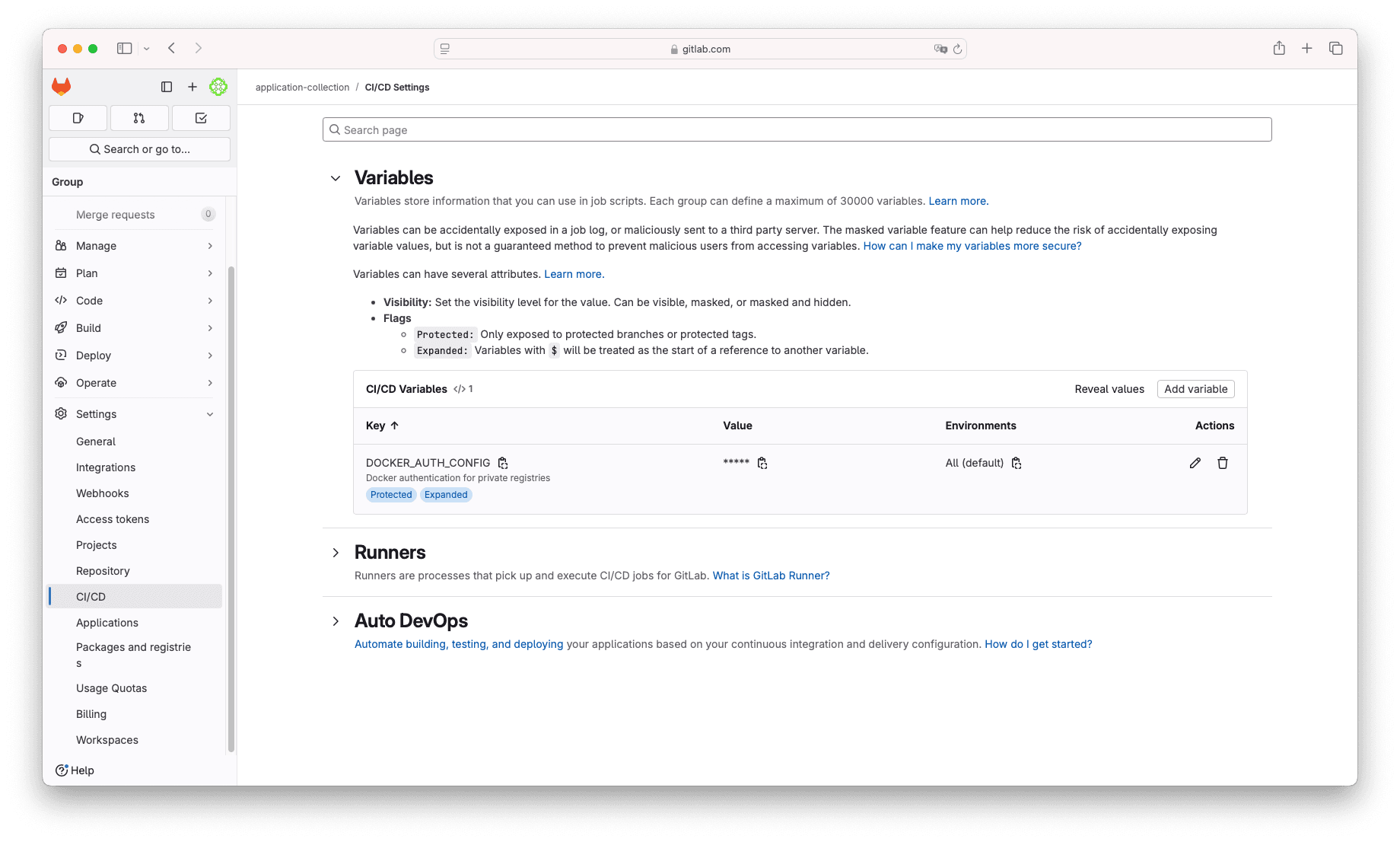
Go to your project or repository Settings → CI/CD and click on the Variables dropdown, now click the button Add variable. On the new
form, select:
- Key:
DOCKER_AUTH_CONFIG - Value: The JSON from above
Notice that you can leave all other fields with their default values. At this point, you are ready to use Application Collection container images in your pipelines.
Use Application Collection container images
In order to make this section easier to follow, we will take GitLab’s example NPM with semantic-release . In this example we will create a basic NPM project with a basic CI/CD pipeline that performs a release on every commit pushed to the main branch. We won’t dive into NPM specifics or other pipeline details apart from the image migration.
This is the original pipeline we’re given:
default:
  image: node:latest
  before_script:
    - npm ci --cache .npm --prefer-offline
    - |
      {
        echo "@${CI_PROJECT_ROOT_NAMESPACE}:registry=${CI_API_V4_URL}/projects/${CI_PROJECT_ID}/packages/npm/"
        echo "${CI_API_V4_URL#https?}/projects/${CI_PROJECT_ID}/packages/npm/:_authToken=\${CI_JOB_TOKEN}"
      } | tee -a .npmrc
  cache:
    key: ${CI_COMMIT_REF_SLUG}
    paths:
      - .npm/

workflow:
  rules:
    - if: $CI_COMMIT_BRANCH

variables:
  NPM_TOKEN: ${CI_JOB_TOKEN}

stages:
  - release

publish:
  stage: release
  script:
    - npm run semantic-release
  rules:
    - if: $CI_COMMIT_BRANCH == $CI_DEFAULT_BRANCH
There’s a single stage (release), job (publish) and therefore image. Thus, we will only need to migrate node:latest. Before getting hands
on the code again and performing the change, a quick note: The public Node.js docker image includes both the runtime and npm tool. In Application
Collection we distinguish 2 flavors tailored for runtime and development. For NodeJs 22, you can find:
- Non-suffixed names: These are meant for runtime usage and contain exclusively the NodeJs binaries.
-devnames: These are designed for development (and CI) purposes, including both NodeJs andnpmbinaries.
For this example, we will use the -dev flavor:
default:
  image: dp.apps.rancher.io/containers/nodejs:22-dev
  before_script:
    - npm ci --cache .npm --prefer-offline
    - |
      {
        echo "@${CI_PROJECT_ROOT_NAMESPACE}:registry=${CI_API_V4_URL}/projects/${CI_PROJECT_ID}/packages/npm/"
        echo "${CI_API_V4_URL#https?}/projects/${CI_PROJECT_ID}/packages/npm/:_authToken=\${CI_JOB_TOKEN}"
      } | tee -a .npmrc
  cache:
    key: ${CI_COMMIT_REF_SLUG}
    paths:
      - .npm/

workflow:
  rules:
    - if: $CI_COMMIT_BRANCH

variables:
  NPM_TOKEN: ${CI_JOB_TOKEN}

stages:
  - release

publish:
  stage: release
  script:
    - npm run semantic-release
  rules:
    - if: $CI_COMMIT_BRANCH == $CI_DEFAULT_BRANCH
🎉 Exactly, a single-line change!